1.4
Early reminders, and Apple's own words
This version adds early reminders, makes the panel quicker to read, and brings every translation in line with Apple’s own Reminders wording.
In 1.4:
-
Set an early reminder. Pick one from a reminder’s menu, from 5 minutes to 1 month before, or type it into the line: “Renew passport 3 Oct 1 week early”, “Call mom tomorrow 9am 15 min early”. The row shows it as a bell.
-
An early reminder set in Reminders stays set. A date change made in Perch leaves it where it is. Options whose time has already passed are dimmed, as in Reminders.
-
“every morning” makes a daily repeat at that hour. So do the other times of day, in every language, including “tous les soirs” and “todas las noches”.
-
Australian and British shorthand. “tomoz”, “arvo”, “sarvo”, “a fortnight”, “every fortnight”, “half past five”, “half six”, “quarter to five”, “5 o’clock”, “5ish”, “9am sharp”, “at lunch”, “after work”, “by EOD”, “first thing”, plus Chrissy, Straya Day, Anzac Day and Boxing Day as dates.
-
Type “/” to see your lists. A “/” at the end of the line shows every list as its coloured badge, and “/w” narrows it to the lists that match.
-
Switching language keeps your place. Picking a language in Settings restarts Perch and brings Settings straight back, in the new language, where it was.
-
Apple’s own words, in every language. Every translation now uses the words Apple’s Reminders uses, and menus read in sentence case outside English. Slovak, German, Spanish, Dutch, Portuguese and Polish name the early reminder as Reminders does; Danish says “færdig” for completed; Dutch says “verlopen” for overdue.
-
A quieter details line. A reminder’s details line puts a dot only before the date. Badges that already have a symbol no longer need a separator.
-
Fixes. An early reminder set in Reminders was wiped by any date change made in Perch. The Due Date submenu’s day names now start with a capital in every language. “None” now matches the wording of the surrounding menu.
-
1.3
Perch speaks eleven languages
Perch has always understood plain words. In 1.3 it understands them in eleven languages, everything you read is translated too, and the app got quicker while we were in there.
In 1.3:
-
Type in your own language. Quick entry and editing now understand German, Spanish, French, Italian, Dutch, Portuguese, Polish, Swedish, and Danish, alongside English and Slovak. “Milch kaufen morgen um 9 Uhr /Einkauf”, “Acheter du lait demain à 9h /Courses”, “Köp mjölk imorgon kl 9 /Inköp”: dates, times, priorities, lists, and repeats, worded the way each language words them, with the same forgiveness for typos.
-
Perch follows your Mac. It reads and types in your Mac’s language, and English always works alongside it, so “tomorrow 9am” is never wrong. Prefer another? Settings has a language picker with all eleven, and Perch restarts when you switch.
-
Links open now. A reminder that carries a link shows it, and now you can click it. Hover to see where it goes, or press ⇧⌘O to open the focused reminder’s link without touching the mouse.
-
Move faster in the list. ⌘↑ and ⌘↓ jump to the first and last reminder, Page Up and Page Down move a screenful, Home and End work too, and holding Shift with any of them extends the selection instead of moving it.
-
The menu bar counts your whole day. In the Icon and Progress style, “6/10” is six done out of the day’s ten, what you finished and what still waits, so the number fills up as you go and a finished day reads “10/10”.
-
Gentler warnings. “Did you mean…?” and its kind now ask in amber. Red is kept for real problems, like a reminder running late.
-
Quicker under load. Completing several reminders at once no longer pauses the panel, long lists group faster, and while the panel is closed Perch fetches only what the menu bar needs.
There are smaller touches too: the menu bar’s right-click menu is plain text now, and many little fixes throughout.
-
1.2.2
Settings in plain words, and a steadier list
This version of Perch reworks Settings so every switch says what it does, keeps your list steady when Reminders is slow to answer, and tidies up a few things in the list itself.
In 1.2.2:
-
Settings explain themselves. Every setting now carries a line underneath saying what it does, in plain words, and that line follows the switch, so it reads the same way whether the setting is on or off. Panel Size has moved to General, with the other appearance settings.
-
A shorter keyboard reference. Shortcuts lists the shortcuts worth learning, worded the way the rest of Perch is.
-
Your list stays put. Perch holds onto your list and quietly retries if Reminders is briefly unavailable, with a note at the foot of the panel while it does. The list also refreshes when your Mac wakes and when you open the panel.
-
Delete from the keyboard. Press ⌫ to delete the selected reminders.
-
Unchecking a reminder is quiet. The row simply comes back, with no confirmation to read. VoiceOver still announces it.
-
1.2.1
Countdown headings and quick-entry fixes
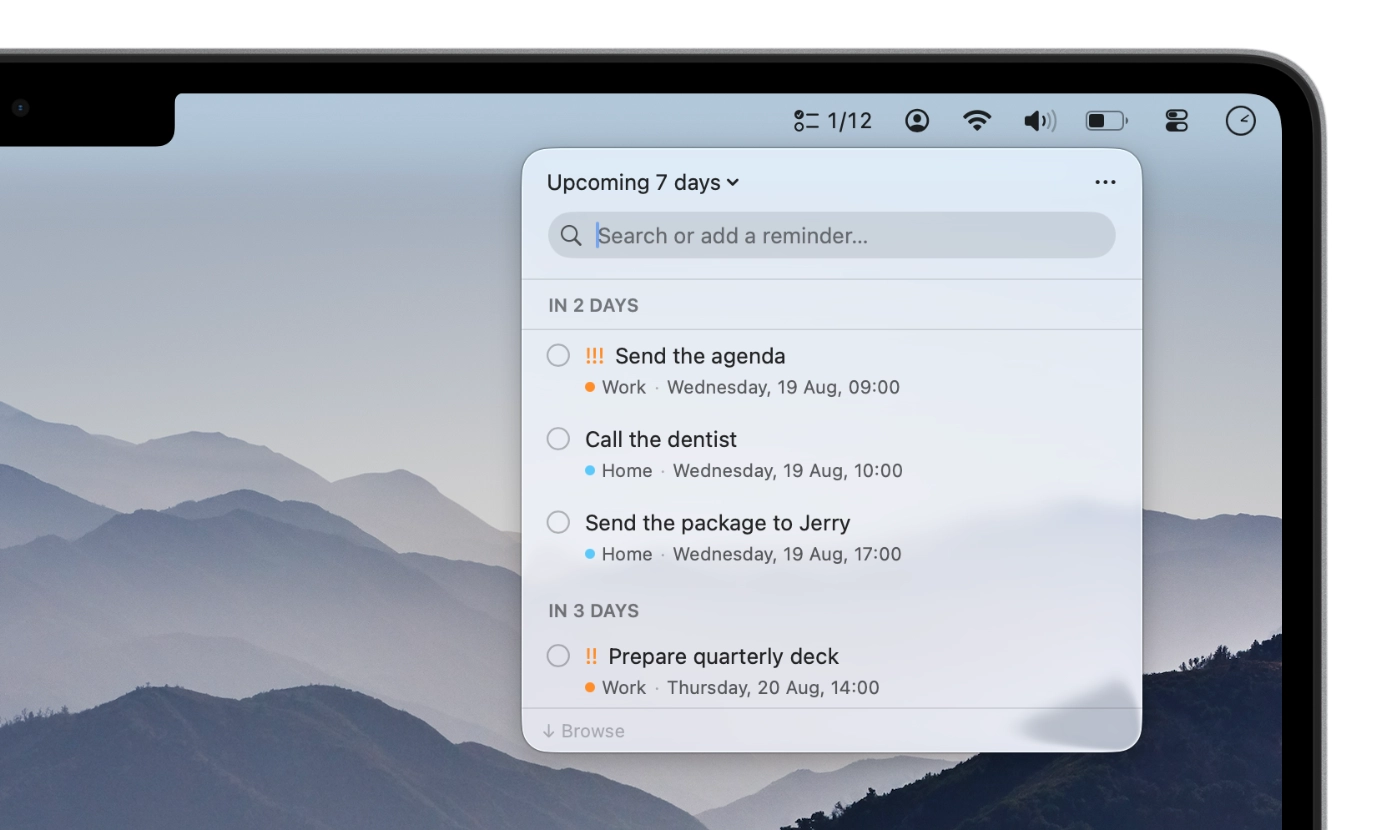
Perch menu bar with countdown headings This version of Perch brings a countdown option for day headings and fixes a few things quick entry got wrong.
In 1.2.1:
-
Day headings, your way. A new setting lets you pick Date (“Thursday, 20 Aug”) or Countdown (“In 4 days”) for the day labels in Upcoming and All. Yesterday, Today and Tomorrow keep their words, and the countdown always counts in days (“In 14 days”, never “In 2 weeks”), so two sections never share a label.
-
Extra spaces no longer lose the day. “tuesday 14:00” means Tuesday at 14:00, in English and in Slovak, tabs included.
-
Short weekdays work where they can only mean a day: “tue 14:00”, “every tue”, “next wed”. That is mon, tue, tues, wed, thu, thur, thurs, fri, sat and sun. Words stay words, so “buy sun cream” gets no date.
-
“due friday 17:00” lands on Friday at 17:00, rather than this very moment. “until friday” and “before friday” too. Real ranges keep their start, so “meeting 2-4pm” is still 2pm.
-
Overdue keeps to itself. When Today holds overdue reminders, the rest of the day now sits under its own Today heading instead of running on beneath Overdue.
Nothing to relearn, just fewer surprises.
-
1.2
macOS 14 Sonoma and more
Perch 1.2 runs on macOS 14 Sonoma and later, so it works on a lot more Macs. It is also more forgiving about how you type: Perch now tells you what it just did and offers to undo it, and it understands more of the ways people really write a reminder.
In 1.2:
-
Perch runs on macOS 14 Sonoma and later. It needed macOS 26 before. On macOS 26 it keeps its glass look, and on older Macs it looks like every other menu in the bar.
-
Editing works in plain words too. Type “tomorrow 9am”, “/Work”, or “every week” straight into a reminder and Perch understands it, just as it does a new one. You see what will change before you commit.
-
And it forgives how you type. “everyday”, “fortnightly”, “tmrw” and “tonite” all work. List names match without their accents, so “/nakupy” finds “Nákupy”. Nearly right is usually close enough, and Perch asks if you meant “tomorrow”.
-
Write the time the way you say it. “at ten” and “at 1000” both mean ten o’clock. A time on its own means today, or tomorrow once the hour has gone, so “Call mom at ten” lands where you expect. Slovak works the same way, from “každodenne” to “o desiatej”.
-
Add several at once, separated by semicolons, and anything you add while looking at Today is due today. A reminder can carry a link too: type a web address and Perch lifts it out, shows it on the reminder, and opens it when you ask.
-
Select several at once. Hold Shift or Command to pick out more than one, then complete, move, delete, or change the priority of all of them together.
-
Whatever you do, Perch says so and offers to undo it. Move a reminder, change its date or priority, rename it, delete it: a line at the bottom tells you, with an Undo button. One Undo takes back a whole batch, and Undo and Redo name what they will take back, like “Undo Move”.
-
A repeating reminder shows up once, on its next date, instead of filling the list with copies of itself.
-
Shape the panel to how you work. Turn a list off in Settings and it leaves Perch altogether. Sort by due date, by when you made it, by priority, or by title, and say how far ahead Upcoming should look. Choose a size, small, medium, or large, and slide Perch from see-through to solid.
-
Every keyboard shortcut sits in one place, with a search box, next to the ones you can change. And the menu bar can show how you are doing: “6/10” is six done today out of ten due.
Perch is easier to reach, too. Allow access to your reminders in System Settings and Perch picks it up the next time you open it, with no restart, and it opens properly from Spotlight even when your menu bar is full. Completed reminders are struck through, recently completed ones are a keypress away, and there are many small fixes throughout.
-
1.1
Perch speaks Slovak
The whole app is translated, and you can write reminders in Slovak too: type
vysávať každú stredu o 9and Perch works out the task, the repeat and the time. (In English, this means “hoover every Wednesday at 9”, since you asked.)- Set a date without typing one. Click the date to pick it off a calendar, or the time to set it on a clock.
- A Due Date menu, one right-click away. Today, Tomorrow, This Weekend or Next Week, each set for the whole day, so nothing lands instantly overdue. Duplicate lives in the same menu.
- Open Perch straight into what you want to see. Today, Upcoming, All and No Date each get a shortcut that works from any app: ⌃⌥1 through ⌃⌥4. You can rebind any of them in Settings.
- Completed reminders can stay in view. A new setting keeps the last day’s finished items at the bottom of the list.
- Settings is a proper window now, with General, Shortcuts and About, rather than a panel fighting for space with your reminders.
New here? First launch now opens with a welcome: where Perch lives, the shortcut that summons it, and how to add a reminder in plain words. Plus the usual smaller refinements and fixes throughout.
Changelog
What’s new in Perch: releases, fixes, and the small details that make the menu bar worth opening.